LIVE

Still Doing the Same Tasks by Hand Every Week?

Give Me 5 Days And I’ll Show You How to Spot the Work You Repeat Every Week That AI Could Do In Minutes

Pull up a chair for five practical live sessions where we’ll pinpoint the manual tasks AI can actually help with and show you how to simplify your workflows—while keeping you firmly in the driver’s seat.

How Much of Your Week Goes to Work You Do on Repeat?

Select the tasks you do manually and see your estimated weekly total update as you go.

SELECT THE TASKS YOU DO REGULARLY APPROX. TIME EACH · TIMES PER WEEK

Where your time goes

See which tasks take up the most time in your week.

PER WEEK

Select your tasks to see where your time goes.

THE REAL COST OF REPETITIVE WORK

Select your repetitive tasks above to see how much of your working week they take.

Time estimates are illustrative starting points. Adjust how often you perform each task to reflect your workload. Actual time varies, and not all of this work can necessarily be automated or eliminated.

Which Task Would You Take Off Your List First?

Look at the task taking up the most time. How much of it is spent finding the same details, drafting the same kind of reply, or updating another tool?

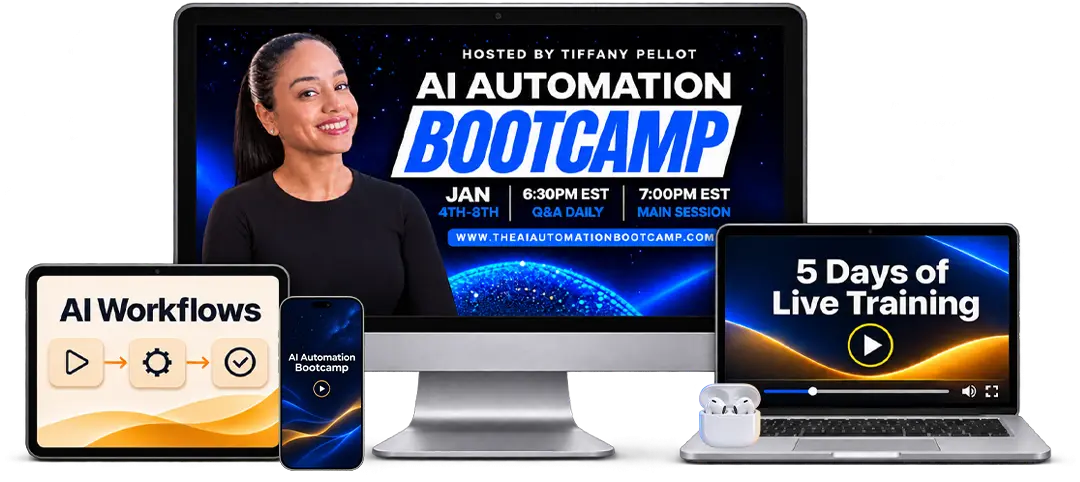
Bring that task to Tiffany Pellot’s free 5-day AI Automation Bootcamp.

You’ll learn how to break it into steps, see where AI can help, and decide what’s worth automating first.

Tiffany Pellot Will Go Live In:

00 Days
00 Hours
00 Minutes
00 Seconds

Imagine Opening Your Laptop on Monday With the Usual Busywork Already Taken Care Of

Follow-ups are drafted, meeting notes are sorted, and client updates are ready for you to review.

01 / YOUR LEADS, ALL IN ONE PLACE

How many potential sales are sitting in your inbox right now?

Someone filled out your form. Another missed a discovery call. A third asked about pricing and went quiet. Instead of jumping between your inbox, calendar, and CRM, a connected workflow brings that activity into one place.

Lead Activity ● Connected
YOUR BUSINESS Activity across your channels Illustrative lead activity
F
Website form New inquiry · Interested in coaching
NEW
C
Booking calendar Discovery call · Missed appointment
MISSED
E
Email inbox Pricing requested · No reply yet
WAITING
CRM
Lead tracker Previous inquiry · Still undecided
REVIEW
≈ 4+ hours saved / week

02 / AUTOMATICALLY ORGANIZED

Your CRM sorts the leads for you.

New inquiries, missed appointments, and unanswered messages get organized as they come in. AI can update records and flag the ones that need attention, without you going through every contact.

≈ 6+ hours saved / week
Pipeline Overview ✦ Auto-sorted
New inquiries Ready for first contact
08
Missed appointments Reschedule follow-up
03
Waiting for reply Follow-up scheduled
05
03 / FOLLOW-UPS IN MOTION

Your leads get followed up with. Even when you're busy.

A missed call can trigger a reschedule message. A new inquiry can get a quick response. AI can prepare and send routine follow-ups using your rules, while you step in for conversations that need you.

≈ 10+ hours saved / week
Follow-Up Activity
FOLLOW-UPS HANDLED 64
THIS WEEK
01
Missed discovery call Reschedule message sent
SENT
02
Pricing inquiry Personal response needed
REVIEW

Illustrative potential weekly savings for a high-volume business with connected workflows. These are not measured or guaranteed results. Actual savings depend on workload, setup, and review time.

Imagine getting 20+ hours of your week back.

Less time buried in repetitive work. More time for the parts of your business that actually need you.

Live On January 4–8, 2027

7 PM ET 6 PM CT 5 PM MT 4 PM PT

What Would You Do With More of Your Week Back?

Maybe you’d finally launch the offer you keep pushing to next month. Maybe you’d pick up your kids without thinking about the work waiting for you when you get home.

Launch the Offer You Keep Putting Off

That offer’s been sitting in a Google Doc for months. With a morning free, you can settle on a price, send it to people who’ve already asked, and see who’s ready to buy.

Give your best clients more of your attention

You spend the afternoon on a client project you’ve been itching to dig into. There’s room to test the idea you mentioned on the last call and show them what it could look like.

Make plans for a weeknight and keep them

You tell a friend you’ll meet them at six. At six, you’re there. The workday ended when you said it would, and your laptop stays closed when you get home.

Start automating the work you repeat every week.

What You’ll Learn in 5 Days of AI Automation Bootcamp

Bring one task you’re tired of doing by hand. Over five live sessions, learn how to break it down, see where AI can help, and map out an automation that fits the way you work.

DAY 01 OF 05 WHAT YOU'LL LEARN

Pick the right task

Look at what you repeat every week, from following up with leads to pulling together client updates.

WHAT YOU'LL TAKE AWAY

One task worth automating first.

YOUR WORKFLOW LIVE PREVIEW

Join Tiffany Pellot live January 4–8, 2027 and learn how to spend less of your week on work you do over and over.

Meet Your Host

Learn With Tiffany Pellot

Why does running a business still feel like doing the same work every week?

You answer a customer question you answered on Tuesday. You pull up another set of call notes to write another follow-up. Friday comes around, and you’re chasing the same details for the same client update.

That’s where I’d start with AI. Pick one task you know inside out. Figure out what starts it, what information AI needs, and what you want to review before anything goes out.

That’s what I’ll walk you through at the free 5-day AI Automation Bootcamp. By the end, you’ll know where to start in your own business and how to tell if the automation is actually making your week easier.

What People Say About Learning AI With Tiffany

Felicia Turner-Muhammad

“I spent MONTHS struggling with GoHighLevel.”

“Then came Tiffany's training on the Claude Chrome extension.”

“I was finally able to build out my webinar registration and follow-up funnel and move forward with launching my weekly training.”

Wendi Charles

“My CRM is up in HighLevel with A2P done. My funnel runs from a free assessment to my paid doors. I post once and Repurpose carries it everywhere.”

“I am 70 years old, and your teaching met me where I was and showed me how to build.”

Azena Correa

“I created a video to launch this on my socials, and I edited it to have four different calls to action for four separate social media platforms.”

“I did that in the content creation engine dashboard that we built this week.”

Sondra McLeod

“I've been working my way through the Classroom, watching the videos, following the step-by-step instructions, and most importantly, putting what I'm learning into action.”

“I'm already seeing progress in my business, especially with improving my customer experience and automation workflows.”

“I finally built my customer acquisition funnel website!!”

Jo Ann Goodie-Charles

“I am so proud of myself. I finally connected my website which is Siteground to chat as well as connected my business email address.”

“I know this is a small step but it changed my mindset from being overwhelmed to I can do this.”

Christ Warren Tessofo

“I have been able to save so much time from busy work using the practical steps in the community, and if you recognize this video was also edited by Claude!”

“This community helps load the guns with tools to help scale and we have to do is use it.”

Anisia Burroughs

“Since joining, I've been implementing instead of just watching:”

“I'm building one place on my own domain where my business runs on a schedule. It has a morning brief and an evening report, so I never have to ask whether something got done.”

“It runs on a $0 recurring software budget and works from my iPhone.”

Chandra Lampkin

“I have completed this lesson and @Tiffany Pellot I used it yesterday to start cleaning out my email.”

“OMG It was amazing. I tagged you in my post. I was watching volleyball while it was happening!”

“Excited to be a part of this community cause I need systems not stress!”

Jekwenta Primm

“Y'all, Trial Reels scheduling via Publer has been a total game-changer for me.”

“Being able to bulk-test content and schedule Trial Reels WITHOUT getting stuck manually posting in the IG app? Absolute time saver.”

“Thank you, Tiffany, for sharing this!”

Ahyssa Dos Santos

“I've been hearing Tiff say for months now, "Take over my computer and do it," before anybody else in the field was already teaching it.”

“You don't have to know how to do all these things anymore. Just know how to communicate what you need done.”

Glenda Starks

“Business website created by Claude”

“thank you TiffAiPrincess. Feedback was great and I'm working on it now.”

“I got my A2P done lol. Too easy. It's crazy that I was way over thinking.”

Antrina Curry

“I was picked to be a guest on TWO podcasts, and I am going on!”

“@Tiffany Pellot thank you for your guidance and for helping me get my speaking engagements. I took what you taught, I applied it, and it is working.”

See What AI Can Handle in a Business Like Yours

Turn a sales call into a follow-up draft, a long video into short clips, or a week of project notes into a client update. Start with a task you’d be glad to spend less time on

  • Qualify new leads against your criteria
  • Draft sales follow-ups
  • Research prospects before a call
  • Draft personalized outreach emails
  • Prepare a brief before a sales call
  • Update your CRM from call notes
  • Pull action items from meetings
  • Draft proposals from discovery notes
  • Turn intake forms into project briefs
  • Create client onboarding checklists
  • Prepare weekly client updates
  • Flag missed project deadlines
  • Turn webinars into emails and posts
  • Find highlights in long videos
  • Generate video captions and subtitles
  • Draft ad variations
  • Adapt posts for different platforms
  • Queue approved social posts
  • Answer FAQs from your help docs
  • Tag and prioritize support tickets
  • Route urgent requests to your team
  • Draft replies using order details
  • Spot recurring customer complaints
  • Sort inbox messages by urgency
  • Turn screen recordings into how-to guides
  • Pull details from invoices and receipts
  • Send appointment reminders
  • Flag overdue invoices
  • Compare vendor quotes
  • Group survey responses by theme
  • Explain changes in your weekly numbers
  • Flag unusual changes in a spreadsheet

Your business can have a good day without taking up all of yours.

You started the business so you could decide how to spend your day. So why does taking Friday afternoon off still mean squeezing Friday’s work into Sunday night?

That’s the part I want to help you change.

At my free 5-Day AI Automation Bootcamp, I’ll show you how to set up AI to handle some of the work that keeps pulling you back to your laptop.

Join Tiffany Pellot live on January 4–8, 2027

What’s Included With Your Free Seat

Bring a task you’re tired of doing manually. Over five live sessions, Tiffany will show you how to decide if it’s worth automating, give AI one clear job, and test it on work you already do.

  • Kickoff Call With Tiffany

    January 3 at 9 PM EST

    Meet Tiffany, get the five-day rundown, and know what to expect before Day 1.

  • Five Live AI Automation Trainings

    January 4–8 at 7 PM EST

    See how AI can draft follow-ups and handle repetitive admin tasks. Pick a workflow you can try in your own business.

  • Daily Live Q&A With Tiffany

    January 4–8 at 6:30 PM EST

    Listen in as Tiffany answers attendees’ questions and walks through how she’d automate real business tasks.

Think of one task you’d gladly take off next week’s to-do list. Bring it to the bootcamp and see what it would take to get it done without starting from scratch every time.

Live On January 4–8, 2027

7 PM ET 6 PM CT 5 PM MT 4 PM PT

Before You Save Your Seat

Here’s what to know about the live schedule, what your free seat includes, and how to follow along if you’ve never built an automation before.

Is the AI Automation Bootcamp really free?
Yes. Your free seat includes the January 3 kickoff call, all five live trainings, and listen-only access to the daily Q&A sessions. The $49 VIP upgrade is completely optional.
Can I join if I've only used AI for emails or captions?
Yes. You don't need previous automation experience. You'll learn how to turn familiar business tasks into steps AI can help you handle.
What if I don't know what to automate first?
You'll learn how to identify repetitive tasks, choose a practical starting point, and map out the process before you build anything.
When are the bootcamp sessions?
Kickoff: January 3, 2027 at 9 PM ET.
Live trainings: January 4–8 at 7 PM ET.
Daily Q&A: January 4–8 at 6:30 PM ET.
What if I can't attend every session live?
You can attend the free sessions that work for you. If you want lifetime access to the replays, that's included with the optional $49 VIP upgrade.
What does the $49 VIP upgrade include?
You can ask your own questions during the daily live Q&A sessions and rewatch the bootcamp trainings anytime. It's a one-time payment, not a subscription.
Do I need to know how to code?
No coding experience is required to follow along. You'll focus on planning useful workflows, giving AI clear instructions, and testing your automation.
Can I ask questions with a free ticket?
Free attendees can listen to the daily Q&A discussions. VIP attendees can submit their own questions.

If Business Doubled Tomorrow, Can You Handle It?

Would new inquiries sit unanswered? Would orders get delayed? Would your team spend half the day waiting for you to tell them what happens next?

Whatever came to mind deserves a closer look.

That’s where growth could put more pressure on your business, and where a better system could make the biggest difference.

At Tiffany Pellot’s free 5-Day AI Automation Bootcamp, you’ll learn how to spot those weak points, decide what to fix first, and see where AI can take on a clear job. The goal is to help your business handle more without every extra order, booking, or request adding more to your day.

Live On January 4–8, 2027

7 PM ET 6 PM CT 5 PM MT 4 PM PT

E&L AI CONCEPTS LLC

Email: [email protected] | Address: E&L AI CONCEPTS LLC 30 N Gould St Suite R Sheridan, WY 82801

© 2026. All rights reserved.

This site is not a part of the Facebook website or Meta Platforms, Inc. Additionally, this site is NOT endorsed by Meta in any way. FACEBOOK is a trademark of META PLATFORMS, Inc.